
Deposits & Withdrawals
How to Withdraw from OKX to a Bank Account (2026): Check Your Available Routes
Need to withdraw money from OKX to a bank account? First check the Sell methods available for your verified region, then choose direct Sell, P2P or a licensed local exchange.
How to withdraw money from OKX to a bank account: first open Buy crypto > Sell and check which payout methods are available for your verified region. There is no universal bank-withdrawal route: the options depend on your country, fiat currency, asset and available payment partners. If direct cash-out is unavailable, use P2P only when it is shown for your region, or transfer the crypto to a licensed local exchange that supports your bank and currency.
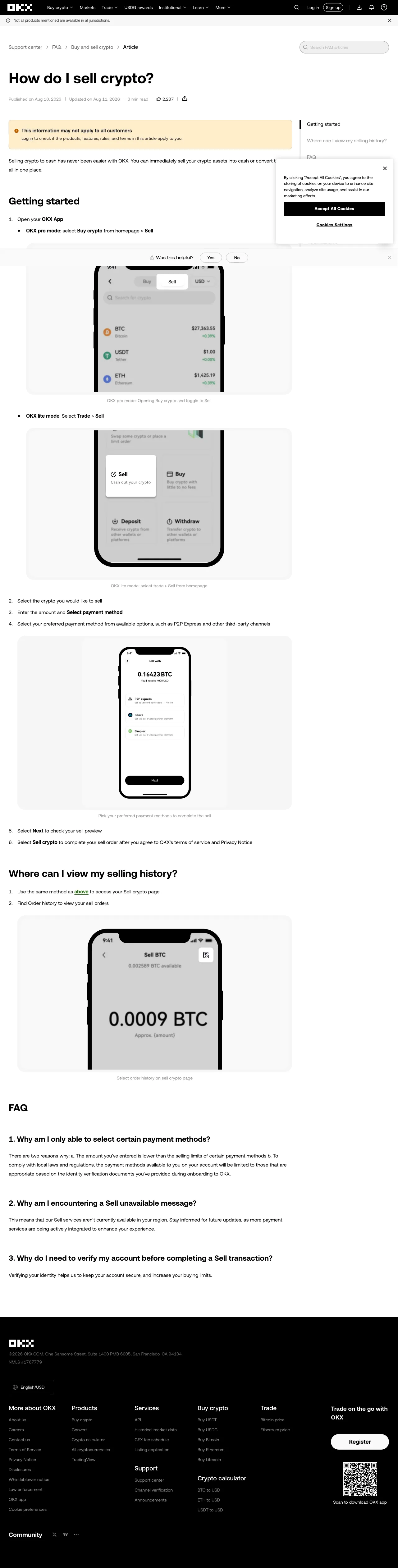
Real screenshot of the OKX Sell crypto help page, checked on 2026-08-12. OKX notes that products and payment methods may not be available in every jurisdiction.
First: check what your account actually supports
- Open the current OKX app or website and sign in.
- Go to Buy crypto > Sell. In Lite mode, the route may appear under Trade > Sell.
- Select the asset and amount.
- Review the payment methods displayed for your account. OKX says these may include P2P Express or third-party channels, but the exact options are account- and region-dependent.
- Compare the final fiat amount, payout destination, processing estimate and provider terms before confirming.
Do not assume that a route described by a user in another country will appear on your account. Search results for India, Singapore or Malaysia often lead to this guide, but the reliable test is still the live Sell screen for your verified region. If no bank or supported payout option appears, do not try to bypass the restriction with somebody else's account.
Route 1: use a direct Sell option when it appears
This is the shortest route because the available provider handles the crypto sale and fiat payout. Select the displayed payment method, read the quote, and confirm only after checking:
- the fiat currency and receiving account;
- the amount you will receive after all fees and spread;
- the provider name and identity-verification requirements;
- the stated payout time and cancellation rules.
A direct Sell option is not the same as Convert. Convert swaps one crypto asset for another; it does not itself send cash to a bank account.
Route 2: sell through OKX P2P when available
P2P connects you with another user who pays through a listed payment method. OKX's official instructions say verified users can use the fiat currency of their registered region and must confirm the correct amount in their own bank or wallet history before releasing crypto.
Basic flow:
- Open P2P trading > Sell and select the local currency and payment method shown for your account.
- Review the order limits, counterparty history and order terms.
- Place the order and keep all communication inside the order chat.
- Check the payment in your own banking app or transaction history. Do not rely on a screenshot, video, SMS or a buyer's claim that payment is complete.
- Release only after the correct amount is actually credited and the payment details match the order. If anything differs, do not improvise; use the order's dispute function.
See the official OKX P2P selling guide and our separate P2P seller safety checklist.
Route 3: transfer to a licensed local exchange
If OKX does not show a suitable fiat payout, a local exchange may provide the bank rail you need. This route has more steps but keeps the crypto sale and bank withdrawal within identified platforms.
- Confirm that the receiving exchange is legally available to you and supports withdrawals to a bank account in your name.
- On that exchange, open the deposit page for the exact asset and copy the address. Include a Memo or Tag if one is required.
- On OKX, choose the same network shown by the receiving exchange. Network names must match exactly.
- Check OKX's live network fee, the receiving platform's minimum deposit, trading fee and bank-withdrawal fee.
- Send a small test amount first. After it is credited, transfer the balance, sell it for fiat and request the bank withdrawal.
Never select a network merely because someone calls it the cheapest. Compatibility comes first, and fees change.
Which route should you choose?
| Situation | Usually the clearest next step | What to verify |
|---|---|---|
| A bank/card/e-wallet payout appears under Sell | Use the displayed direct Sell route | Final quote, provider, payout account and timing |
| P2P appears and you accept counterparty risk | Use the in-platform P2P order flow | Actual bank credit, order details and dispute access |
| No suitable fiat route appears | Transfer to a licensed local exchange | Legal availability, matching network and total fees |
| Someone proposes a private off-platform deal | Do not proceed | No platform process means no reliable dispute path |
Common questions
How do I withdraw money from OKX to a bank account?
A bank cannot receive USDT directly. You first sell it through a cash-out channel shown in OKX, sell it through P2P, or transfer it to a platform that supports your local fiat and bank withdrawal.
Why can another user see a bank option that I cannot?
OKX states that products, features, rules and terms may not apply to every customer. Account region, identity verification, currency, asset and provider coverage can all change what appears.
Should I move assets to the Funding account first?
Follow the prompt shown by the selected route. OKX's P2P instructions may direct you to manage funds between Funding, Trading or Earn when the selected balance is insufficient.
Can I use a bank account belonging to someone else?
Do not use another person's account to get around regional or identity rules. Use payment details accepted by the live order or payout provider and keep records showing the source and destination of funds.
Bottom line
The correct answer to “how do I withdraw money from OKX to my bank account?” begins with the live Sell screen, not a universal country list. Use the direct route if your account offers one, use P2P only through the official order flow, or move the asset to a licensed local exchange with a compatible network and bank rail. Compare the final amount, test small and save the quote, transaction ID and withdrawal receipt.
Affiliate disclosure: This article may contain referral links. If you register through an OKX referral link, the platform's current promotion terms determine any benefit, and this site may earn a commission at no extra cost to you.
Risk warning: Crypto assets are volatile and high-risk. This guide is educational, not financial or legal advice. Follow the rules that apply to your jurisdiction.